
Warehouse Security Checklist: Cameras, Remote Monitoring & Patrol Response
September 22, 2026
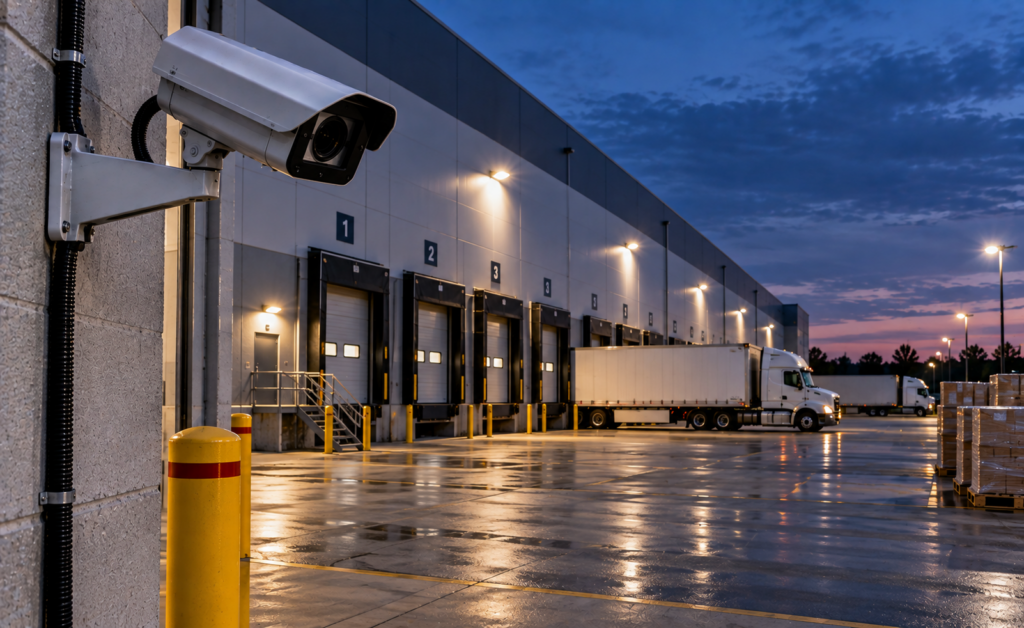
Warehouses and distribution centres concentrate inventory, equipment, vehicles and shipping activity in one location. That makes them operationally efficient, but it also creates a large security footprint with loading docks, employee entrances, fenced yards, trailer areas and periods of reduced staffing.
A strong warehouse security program should combine physical controls, clear operating procedures and the right mix of cameras, remote video monitoring, mobile patrol and onsite security. The best approach depends on the facility’s hours, inventory, traffic patterns and risk areas.
This checklist is designed for warehouse managers, property managers, distribution operators and facility teams reviewing an existing security program or planning an upgrade.
1. Map Every Vehicle and Pedestrian Access Point
Start by documenting every way a person or vehicle can enter the property. That includes obvious entrances and less-used service points.
Review:
- main vehicle gates;
- employee parking entrances;
- visitor entrances;
- shipping and receiving access;
- pedestrian gates;
- staff doors;
- emergency exits;
- service corridors;
- roof or utility access where applicable; and
- connections to neighbouring properties.
Every access point should have a defined purpose, access method and security responsibility.
2. Review Loading Dock Security
Loading docks are often among the highest-risk warehouse areas because they combine inventory movement, vehicle access, contractor activity and multiple doors.
A loading-dock review should check:
- whether dock doors are secured when inactive;
- how drivers and visitors are verified;
- whether dock cameras clearly show people and vehicles;
- whether trailer areas are visible;
- whether after-hours deliveries are pre-authorized;
- whether employee-only doors are controlled; and
- how suspicious activity is escalated.
Remote monitoring can be especially useful after hours when legitimate dock activity is limited.
3. Confirm Camera Coverage Around the Building Perimeter
Warehouse security cameras should provide more than general overview footage. The system should give enough detail to understand how an event begins, develops and ends.
Priority exterior views often include:
- vehicle entrances;
- pedestrian gates;
- building corners;
- loading docks;
- trailer parking;
- fenced storage yards;
- employee parking;
- service roads; and
- rear or side doors.
Our Security Camera & CCTV Installation service can assess existing coverage and identify blind spots or outdated equipment.
4. Test Nighttime Camera Performance
Warehouse camera systems should be reviewed under the same conditions in which they will be relied on.
Nighttime testing should look for:
- dark zones;
- headlight glare;
- overexposed entrances;
- poor infrared performance;
- motion blur;
- camera reflections;
- dirty lenses or domes; and
- areas where people cannot be distinguished clearly.
A camera that looks good during the day may not be suitable for overnight monitoring.
5. Determine Whether Existing CCTV Can Support Remote Monitoring
Many warehouses already have CCTV installed. Those cameras may be reusable for active remote monitoring if they provide suitable video quality, connectivity and compatibility.
A technical review should check:
- camera make and model;
- NVR, DVR or video management system;
- available remote video streams;
- network reliability;
- camera placement;
- night performance;
- analytics capability; and
- speaker integration options.
Read Can Existing CCTV Cameras Be Used for Remote Video Monitoring? for the full compatibility checklist.
6. Define Which Zones Should Be Remotely Monitored
Not every warehouse camera needs active monitoring. The most effective programs prioritize zones where suspicious activity can be identified clearly and where operator action can make a difference.
Common monitored zones include:
- gates after hours;
- loading docks;
- trailer areas;
- fenced equipment yards;
- rear entrances;
- employee parking;
- restricted interior areas; and
- high-value storage zones.
For a broader commercial strategy, see Remote Video Monitoring for Commercial & Industrial Properties in Ontario.
7. Set Clear Remote Monitoring Hours
Monitoring schedules should match the facility’s operations.
A distribution centre operating 24 hours a day requires a different approach from a warehouse that closes at 7:00 p.m.
Possible schedules include:
- overnight monitoring;
- weekends;
- statutory holidays;
- specific closed zones;
- high-risk exterior areas monitored continuously; or
- different schedules for different camera groups.
The monitoring provider should know what legitimate activity is expected during each monitored period.
8. Define the Operator Response Procedure
Remote monitoring is most effective when operators have clear instructions before an incident occurs.
The response procedure should define:
- when an event requires review;
- when audio talk-down should be used;
- who the primary warehouse contact is;
- who the backup contact is;
- when mobile patrol should be dispatched;
- when onsite security should be contacted;
- when emergency services may be contacted; and
- how the event should be documented.
See What Happens When a Remote Security Operator Detects an Intruder? for the step-by-step workflow.
9. Consider Audio Talk-Down in Exterior Zones
Compatible speakers can give a remote operator a way to intervene when suspicious activity is verified.
Talk-down is most useful when:
- the operator has a clear camera view;
- the speaker covers the exact monitored area;
- the network connection is reliable;
- camera and speaker zones are correctly mapped; and
- the warehouse has defined instructions for when audio should be used.
Typical locations may include vehicle gates, loading docks, trailer yards and rear service areas.
10. Decide When Mobile Patrol Should Respond
Remote video monitoring can identify and verify activity, but some events require physical attendance.
Mobile patrol can provide a response layer for facilities that do not maintain a guard onsite throughout the night.
A warehouse may use:
- remote monitoring for detection and verification;
- talk-down for immediate intervention;
- mobile patrol for physical attendance; and
- incident reporting for management follow-up.
11. Review the Role of Onsite Security Guards
Some warehouse operations still require onsite security guards because the duties extend beyond camera observation.
Guard responsibilities may include:
- vehicle access control;
- driver verification;
- visitor management;
- physical patrols;
- key control;
- contractor access;
- emergency support; and
- physical response inside the facility.
Remote monitoring can complement guards by extending visibility across exterior zones that are difficult to patrol continuously.
12. Protect Trailer and Yard Areas
Trailer yards and outdoor storage areas can contain significant value and may sit far from the main building.
Review:
- fence condition;
- gate access;
- lighting;
- camera coverage;
- trailer identification procedures;
- authorized parking areas;
- blind spots between trailers; and
- after-hours response instructions.
Camera design should allow operators to understand movement through the yard rather than showing only isolated views.
13. Review Employee and Visitor Parking
Parking areas are part of the warehouse security perimeter.
Review whether cameras cover:
- vehicle entrances;
- pedestrian routes to the building;
- employee entrances;
- visitor spaces;
- isolated areas; and
- connections between parking and loading areas.
For a detailed parking strategy, see Remote Video Monitoring for Parking Lots & Garages in Ontario.
14. Control Employee, Contractor and Driver Access
Warehouse sites can have frequent movement by employees, temporary workers, truck drivers, contractors and service vendors.
The security plan should define:
- who is allowed onsite;
- which entrances each group should use;
- whether identification is required;
- how after-hours access is approved;
- how temporary credentials are controlled; and
- who is notified when unauthorized access is attempted.
Access control systems can help automate some of these rules. See our Access Control Systems service.
15. Create a Procedure for Authorized After-Hours Activity
Remote operators need to distinguish suspicious activity from legitimate overnight work.
Warehouse management should provide clear information about:
- scheduled deliveries;
- cleaning crews;
- maintenance contractors;
- late-shift employees;
- approved vehicles; and
- temporary construction or service work.
Without accurate schedules, operators may waste time verifying activity that should already be known.
16. Check Lighting Around Critical Security Zones
Lighting supports both physical security and camera performance.
Review lighting at:
- vehicle gates;
- pedestrian entrances;
- loading docks;
- parking lots;
- trailer yards;
- building corners;
- service roads; and
- rear exits.
Lighting should improve visibility without creating excessive glare for cameras.
17. Review Fencing, Gates and Physical Barriers
Cameras should not be the only perimeter control.
Inspect:
- fence damage;
- gaps under or around fencing;
- gate hardware;
- vehicle barriers;
- pedestrian gate locks;
- areas where objects can be used to climb the fence; and
- adjacent property access.
Repeated remote monitoring alerts at the same perimeter location may indicate a physical-security weakness that needs correction.
18. Define Incident Reporting Requirements
Warehouse management should decide what information is required after a security event.
A useful incident record may include:
- date and time;
- camera or area;
- description of the activity;
- operator action;
- audio talk-down used;
- contacts notified;
- patrol or guard response;
- how the event ended; and
- recommended follow-up.
Consistent reporting can reveal patterns that are difficult to see when incidents are reviewed individually.
19. Test the Security Program Regularly
A warehouse security plan should be reviewed whenever operations change.
Retest the program after:
- camera upgrades;
- network changes;
- new tenant or warehouse operations;
- yard reconfiguration;
- changes to shipping hours;
- new access points;
- major staffing changes; or
- repeated incidents in the same area.
20. Use a Layered Security Model
No single security measure addresses every warehouse risk.
A layered program may combine:
- access control;
- CCTV;
- remote video monitoring;
- audio talk-down;
- mobile patrol;
- onsite security guards;
- lighting;
- fencing;
- incident reporting; and
- site-specific operating procedures.
Identigate provides security programs for Warehouses and Distribution Centres across Ontario.
Warehouse Security Checklist Summary
Before finalizing a warehouse security plan, confirm that you can answer yes to the following questions:
- Are all vehicle and pedestrian access points documented?
- Are loading docks clearly covered by cameras?
- Is nighttime image quality acceptable?
- Are existing cameras compatible with remote monitoring?
- Are monitored zones and hours clearly defined?
- Does the operator have a written response procedure?
- Are talk-down speakers positioned correctly where used?
- Is mobile patrol available when physical attendance is required?
- Are guard duties clearly defined?
- Are trailer and yard areas adequately protected?
- Are parking areas covered?
- Are employee, visitor and contractor access procedures documented?
- Is authorized after-hours activity communicated?
- Are lighting, fencing and gates maintained?
- Are incidents documented consistently?
Frequently Asked Questions
What is the most important warehouse security measure?
There is no single measure that covers every risk. A layered program combining physical controls, cameras, access procedures and an appropriate response model is usually more effective than relying on one technology.
Can warehouse cameras be monitored remotely?
Yes, where the camera system provides suitable video quality, connectivity and compatibility with the monitoring platform.
Can remote monitoring replace a warehouse night guard?
It may reduce some observation-focused coverage at certain facilities, but duties involving access control, physical patrols and in-person response may still require onsite guards.
Should loading docks have separate cameras?
Loading docks usually benefit from dedicated views that show dock doors, vehicle approaches and surrounding activity clearly.
Can mobile patrol respond to warehouse alerts?
Yes, where patrol dispatch is part of the security program and the site’s escalation procedure authorizes it.
How often should warehouse security be reviewed?
Review it whenever operations, access points, camera coverage or incident patterns change, and perform a broader periodic review even when no major changes occur.
Build a Warehouse Security Program
Warehouse security works best when cameras, remote monitoring, access control, patrol response and onsite security are coordinated around the facility’s actual operations.
Identigate Security Services provides remote video monitoring, CCTV, mobile patrol, security guards, access control and integrated warehouse security programs across Ontario.
Explore More Security Resources
Review Identigate’s security services, systems, industry solutions and service areas for Toronto, the GTA and Ontario.
Need a Site-Specific Security Program?
Tell us about the property, operating environment and security requirements. Identigate can review the scope and recommend an appropriate combination of personnel, patrol, monitoring and technology.